Challenge
Microsoft Office Division Evolution
Designing Microsoft's transition from desktop productivity to connected work
Across Work Essentials, Office Live, and Office 365, I designed and prototyped task-centered experiences—from connected resources and collaboration to administration flow and IA.
Contribution
Designed and prototyped task-centered experiences; owned Office 365 administration flow, information architecture, and executive vision.
Evidence / outcome
Preserved walkthroughs, prototypes, and usability evidence document the direction; they do not prove a full-product launch.
FEATURED EVIDENCE
Highlights
A quick scan of the moments that best explain the problem, the pivot, and the payoff.
01 · Office Online / Work Essentials
Start with the work, not the application
Quentin's role grew from tutorial-video storyboards and artwork into task-centered interaction concepts, including Win32 add-ins and the Segmented Demo Player. Work Essentials organized templates, training, demonstrations, and lightweight solutions around recurring information-worker tasks—rather than asking people to start with an Office application.
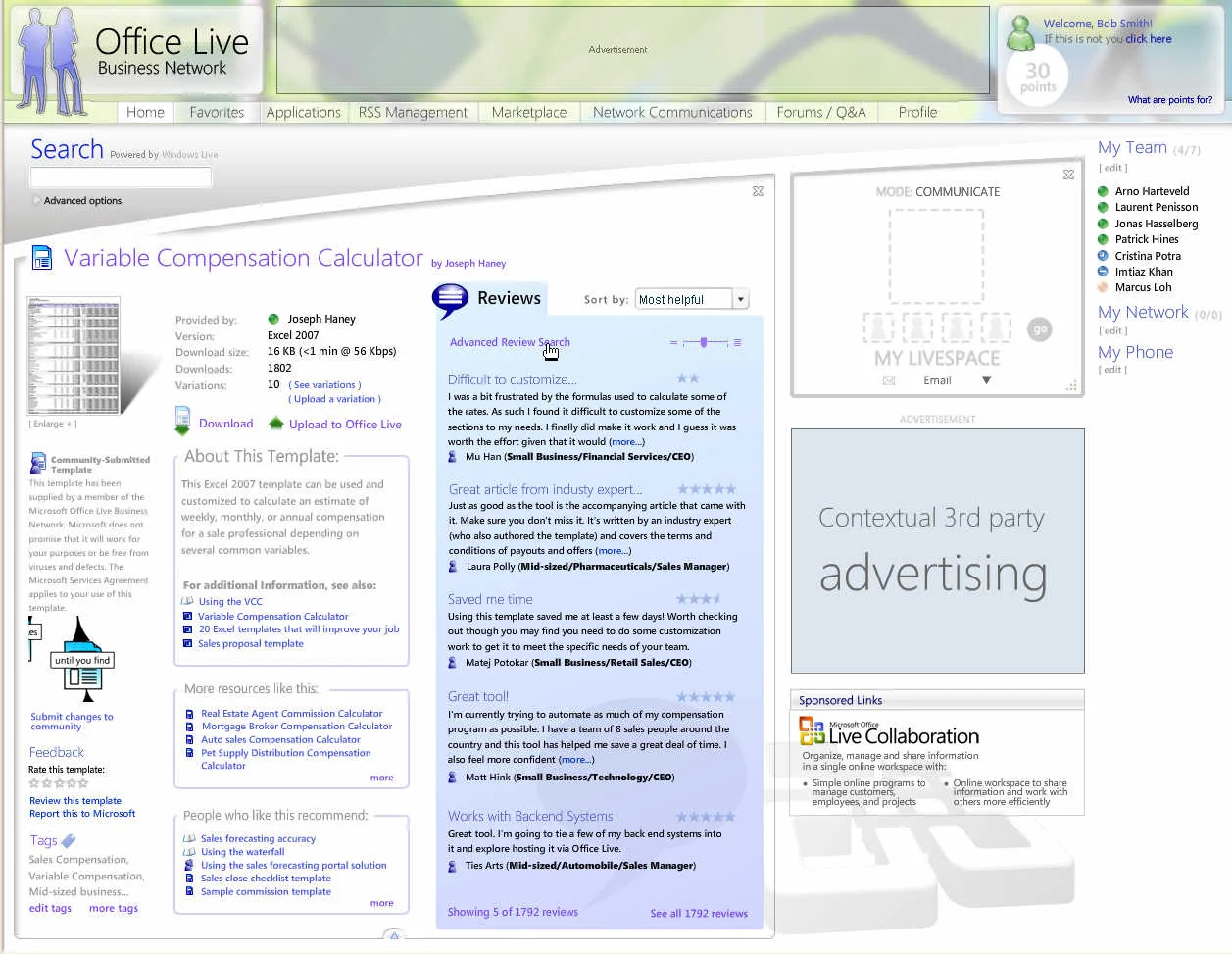
02 · Office Live Business Network vision
Connect discovery, peer knowledge, and tools to the work
Assigned the Blue Sky Vision, Quentin worked from Community and Web 2.0 input from two subject-matter experts to design concepts and mocks, create the animated hand interaction, and build the Flash demonstration. A developer supported the interactive hand behavior, and Quentin presented the prototype with a program manager. The walkthrough and stills record a design direction—not a claim that every element shipped.
Supporting evidence
03 · Office Live Workspace
From finding resources to coordinating work
Quentin contributed to Office Live Small Business through the HOME/SHELL redesign and Configurator prototype/testing, then to Workspace future-state concepts with the technical fellow. The selected Workspace screens provide project context; they are not a claim that Quentin individually designed every surviving screen or that Workspace directly followed Blue Sky.
04 · Activity and coordination
04 · Microsoft Online Services / Office 365
Turn complex service setup into a guided path
The design problem moved from individual work to organizations making decisions across services, identity, licensing, migration, trials, and administration.
With a program manager, two user researchers, a CSG designer, and input from roughly seven to eight product managers, I owned the end-to-end flow, information architecture, and executive vision across discovery, setup, migration, and service handoffs. The architecture was intended to support 30+ services.
01 · Setup path
Services
Choose services — Begin by establishing the online services an organization needs.
My approximately 114-page executive vision led to a large interactive Blend/SketchFlow prototype co-developed with a contractor developer-designer. I maintained the flow, sitemap coverage, and experience fidelity while the contractor handled much of the heavier implementation; visual execution was shared. The cross-functional vision work received a Microsoft Gold Star Award. These artifacts document a direction and prototype, not proof that the full concept shipped.
Historical concept sequence · representative design work from the period
Prototype entry

Explore the reconstructed Office 365 administration prototype
The original Blend/SketchFlow prototype was co-developed: Quentin owned flow, sitemap coverage, and experience fidelity while a contractor developer-designer handled much of the heavier implementation. This modern browser reconstruction preserves that interaction vision for review; it is not original production code or proof that every screen shipped.
Preserved reconstruction · interaction vision · guided exploration
Reflection
Test the assumptions, not just the interface
Usability testing taught me to treat uncertainty as design input. When participants hesitated or said something felt wrong, I learned to ask why rather than defend the work.
That practice still guides me: design with conviction, then test the assumptions underneath it.